
The assembled branch
A trial branch rebuilt from the main branch and the ready features, to test before merging: read, rebuild, freeze, exclude.
Checked in the application on September 5, 2026
Between “the merge request is open” and “it is merged into the main branch”, you have to try it out. The assembled branch is a trial branch, dev by default, that Deployer rebuilds on every change from the main branch and the eligible features, then pushes into each repository. The team’s CI does the rest: it is the CI that deploys the trial environment, never Deployer.
The Assembly screen answers three questions: what runs on the assembled branch, why is my feature not on it, and what happened. It is a screen you read in four seconds; its actions are remedies.
Who can Product ownerDeveloperManagerAdministrator
Everyone reads the screen, the candidates and the history. Rebuilding, freezing, excluding and reinstating require the product owner role at least. Setup and settings are in the configuration, administrators only.
Setting the module up
Who can Administrator
The module is off when a workspace is created, so the first contact with the screen is an empty state that sends the administrator to Configuration, “Assembly” section, and tells the other roles whom to contact.
- Enable the module and name the branch
While the module is off, the tab does not exist. The assembled branch name is a free field,
devby default, validated as a Git reference: it does not exist yet when you name it. Changing it renames nothing and deletes nothing in GitLab.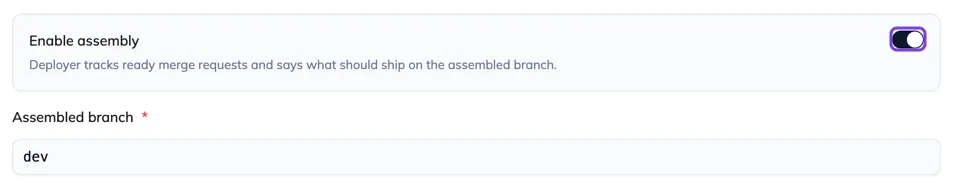
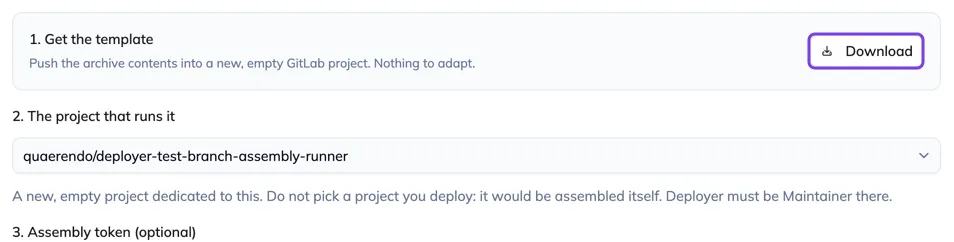
- Choose the orchestrator project
The rebuild runs in a GitLab pipeline, on a dedicated project searched across all of GitLab, never among the linked projects (it would assemble itself). The pipeline template is downloaded next to it, with the three-line procedure. The selector flags an access below Maintainer and an already deployed project.
- Set the assembly token
Optional: without it, assemblies go through the GitLab connection token. Once set, it shows by its prefix, like the connection token, with “Replace” and a bin; nothing leaves before “Save”. Its expiry is shown below, in amber at thirty days; “Expiry unknown” is not a failure, some tokens cannot be introspected.

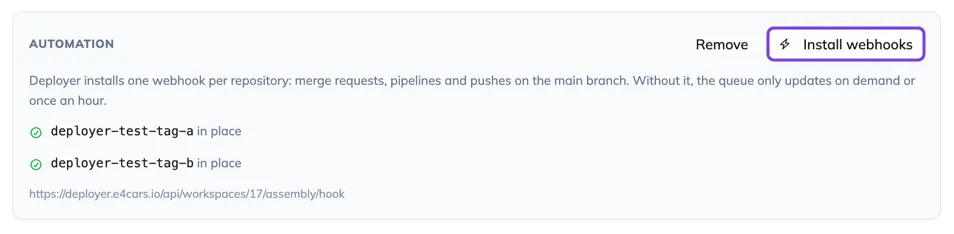
- Install the webhooks
They are how Deployer learns that a merge request has moved. The state is re-read from GitLab project by project, and the button installs what is missing. A project without a hook works blind: a banner will name it on the Assembly screen.
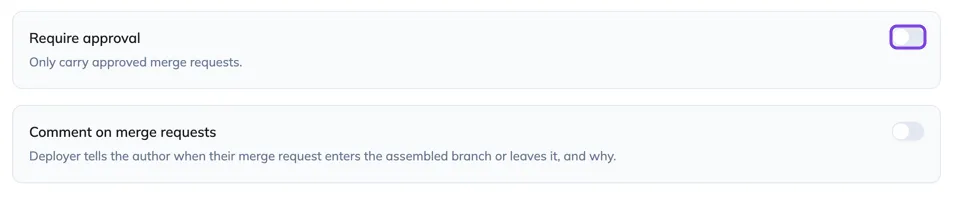
- Require approval, or not
By default, an unapproved merge request can be carried: trying comes before approving. Requiring approval has a counterpart: an approval reset on every push takes the feature out of the trial environment at the moment the developer has just fixed it.
Each step shows what was observed in GitLab, not what Deployer believes it did: a setup that reports success and does not work would be discovered hours later.
Reading the state card
One sentence, readable without knowing anything about the module: “dev = master@a1b2c3 + 3 features, rebuilt 4 minutes ago”. Then the state of the last assembly (succeeded, partial, running, failed, expired), the number of repositories pushed (“2 of 16 projects pushed” is information, the other fourteen were already up to date), and the aggregated state of the CI pipelines on the branch, repository by repository, cross-checked against the pushed commit: a green pipeline on another commit is counted apart, “1 repository on another version”.
The card counts what the branch carries, not what was sent to it: a candidate refused at merge by the build is not in it. While an assembly runs, the sentence says “assembles n features”. While none has run yet, it says what would go.
The screen bar carries two freshnesses: the date of the last GitLab event received, and the date of the last assembly. An event-fed screen can show a stale picture with complete confidence: after an abnormally long silence on an active workspace, a banner offers to check the webhooks. “Read GitLab” starts a full read of the open merge requests, a few dozen seconds, visible to every member.
The list: four groups
Candidates are ranked in order of usefulness: what runs, what should run and does not, what is not ready, what nobody has proposed.
| Group | What it contains |
|---|---|
| Carried | The features on the branch, numbered in assembly order. The rank explains why a feature loses a conflict against another: first come, first served. |
| Held back | What should be there and is not, with the cause on the line: conflict with whom, excluded by whom, no longer eligible. The only category you act on. |
| Waiting | What is not eligible yet, with what is missing and where: “waiting for frontend”, “CI failed on backend”. It is not a fault. |
| Drafts | Folded by default: their author said themselves they were not ready. An exclusion or a conflict takes them out of this group. |
A card carries the board, the number, the issue title, and one badge per project touched whose icon says the state of its merge request: green tick assemblable, amber cross blocked, grey clock not yet settled by GitLab. A merge request without an issue shows like the others, with the mention “no issue”: it is legitimate, but coordinated with nothing.
- Filter and search
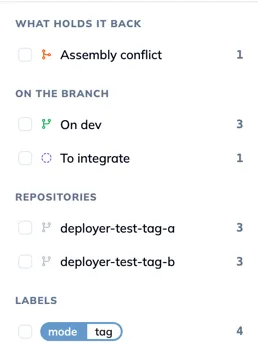
The same rail as Features: Boards, What holds back (GitLab’s conflict against the main branch, settled by a rebase, is distinct from the conflict between two candidates, settled by waiting for the next assembly), On the branch, Repositories, Labels. The search also covers the source branch of the merge requests: you often arrive here with a branch name in front of you. The filter only touches the list, never the state card.
- Open a candidate
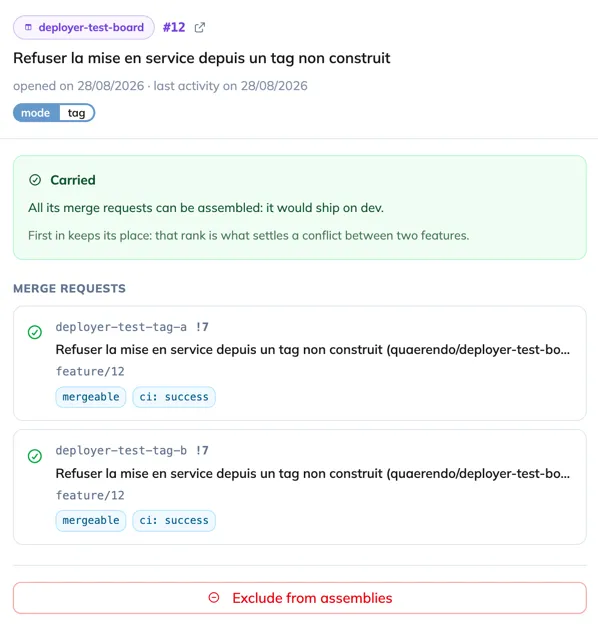
The panel says, in order: what it is (the board, the number, the title, the issue labels); why it is there or not (“conflict with #3857, already assembled, on pom.xml in backend; first come first served, #3857 has been eligible since Tuesday 9am”); what it goes through (the merge requests, with their state towards the assembly, not towards the merge); the remedy; and the candidate’s verdict history, which answers “since when is it broken”.
Rebuild, freeze, exclude
Who can Product ownerDeveloperManagerAdministrator
The three actions are remedies. Normally, the branch rebuilds itself: a webhook signals that a merge request has moved, a short window opens (“Rebuild in 30s”), and the assembly starts.
- Rebuild
“Rebuild” starts an assembly again. When nothing has changed since the last one, Deployer refuses and offers “Rebuild anyway?”: that is the repair path, for instance when the previous rebuild never started. An assembly already running is not doubled.
- Freeze
“Freeze” holds the branch still for a chosen duration, the time of a trial that must not move under your feet. The card takes a blue banner saying who, since when, until when, why, and how many changes are waiting; “Rebuild” disappears, “Unfreeze” takes its place. The reason is suggested, not required: freezing must take one click. On expiry, the rebuild starts again on its own if changes are waiting.
- Exclude a feature
At the bottom of a candidate’s panel, “Exclude from assemblies” holds it back for a chosen duration, with a required reason: it is the only explanation its author will receive. The feature moves to the held back ones, marked “Excluded by Claire: breaks the front build”, with the expiry. “Reinstate” and “Extend” are then offered. It is the only remedy when the simulation sees nothing but the build breaks.

The assembly history
In the History menu, the “Assemblies” entry lists each assembly: when, triggered by what (requested, unfreeze, or a change), its state, how many features it carried, and the link to the orchestrator pipeline. Opening an assembly shows what got in and what was refused, candidate by candidate. A discreet link on the state card leads there too, next to the state of the last assembly: that is where you go after reading “failed”.
| State of an assembly | What it means |
|---|---|
| Succeeded | The branch was pushed everywhere, the repositories already up to date were not pushed again. |
| Partial | Some repositories failed; they are named, with the link to their pipeline. The others are fine. |
| Failed | Nothing was pushed. The pipeline says why. |
| Expired | The job did not report within the time limit. It is not a code problem: see the pipeline. |
| Abandoned | Someone stopped a running assembly. |
Two healthy states not to read as errors: “Nothing to assemble”, when no merge request is open, the assembled branch then equals the main branch; and “Nothing would ship: all 10 features are held back”, which on the contrary is the case to look at closely.